The coach's walkthrough
A guided look at VolleyIQ for club and high school coaches, from the first tap on game day to the AI reading your tournament afterward. Demo logins with a full season of data are at the bottom, so you can try everything you see here.
01
StatPad: live stat entry that keeps score for you
StatPad mirrors how a rally actually unfolds, so the next tap is always the obvious one. Your six players sit in their real court positions, the court itself is where you tap, and every touch is rated as it happens — the score, serve, and rotation follow on their own.
- Each rally moves serve, then in-play, then terminal. Record digs and assists while the ball is live, end the rally with the kill, ace, block, or error
- Terminal stats score the rally automatically, and side-outs rotate the court for you
- Ace or serve error? No player tap needed, because only the server can do those
- Color does the thinking: lime is your ball, red is theirs, ice blue means the rally is live
- A confirmation ribbon flashes on every committed stat, and undo reverses the whole rally, score and all
Substitutions are tracked against your ruleset (USAV 12, NFHS 18, or FIVB 6), libero rules are enforced automatically, and planned subs from your lineups prompt at exactly the rotation you chose.
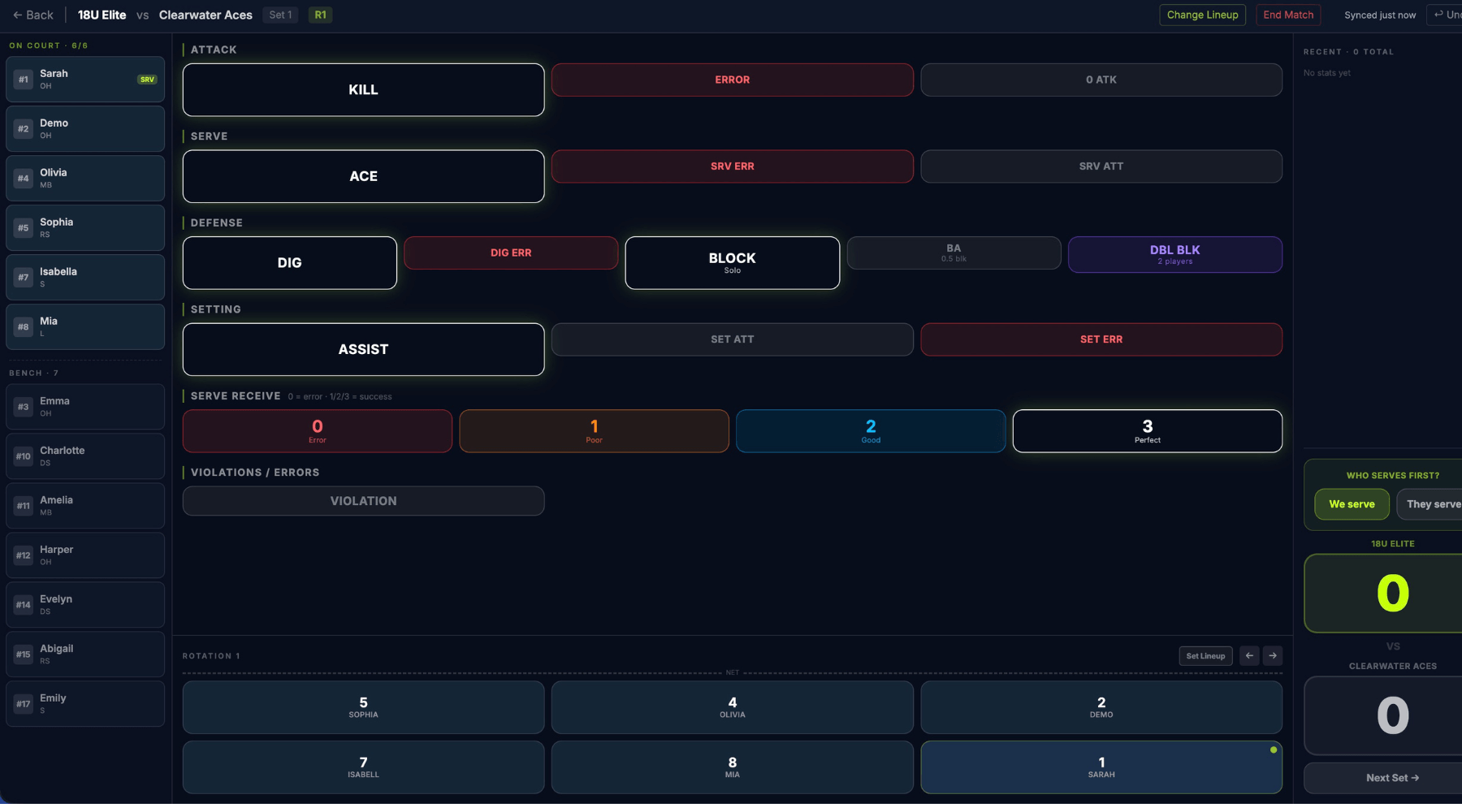
StatPad: the court is your tap surface, and the log groups each rally as it ends
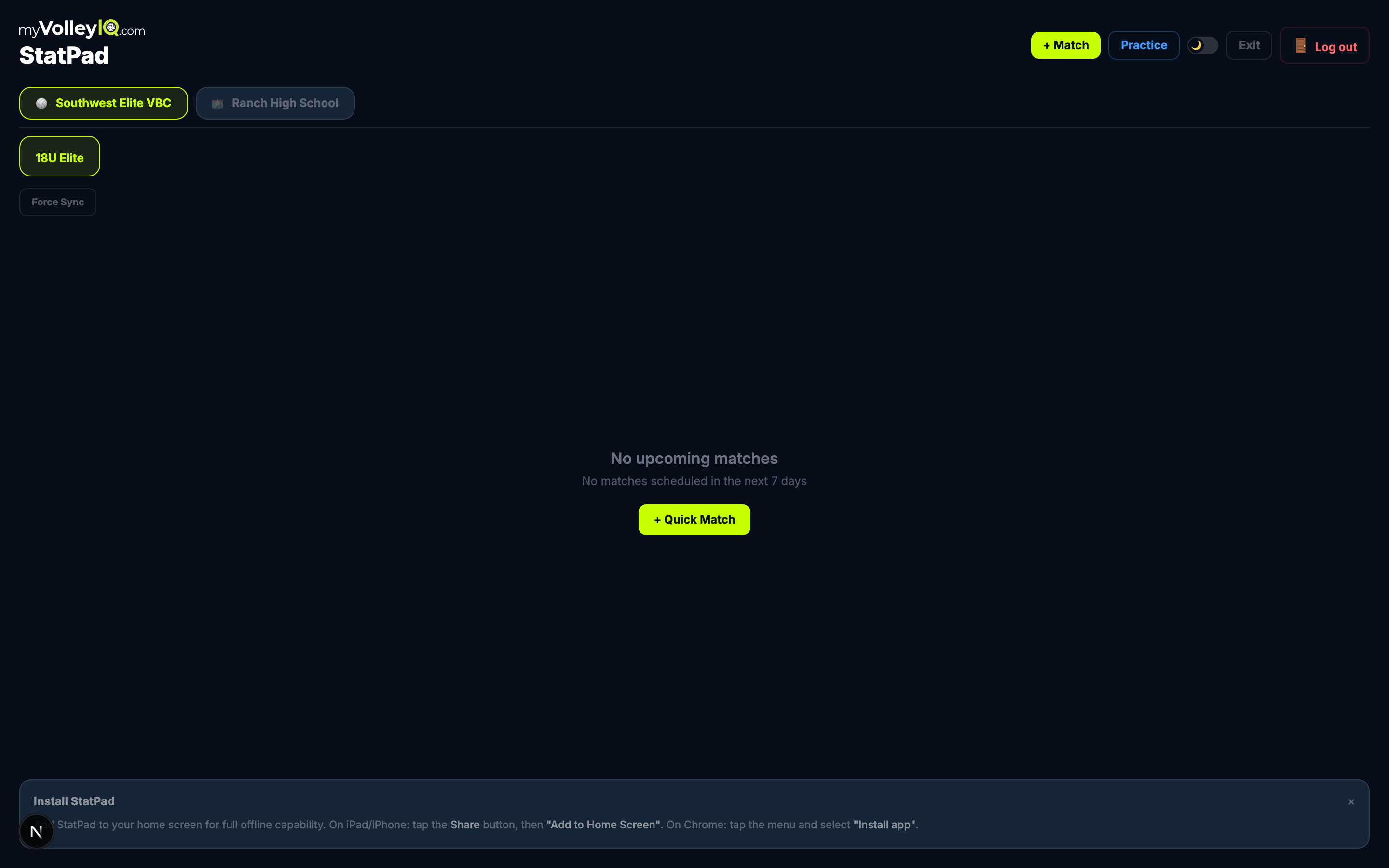
The StatPad home screen: matches, tournament cards, practice mode, Force Sync
02
Built for real gyms and long weekends
Tournament gyms rarely have usable Wi-Fi, so VolleyIQ never assumes a connection. Install it as an app on your iPad and every stat saves to the device first, then syncs itself when the internet comes back.
- Full offline stat entry, including creating a match at the gym with no signal
- Multi-day tournaments with expandable day cards and TBD opponents you name later
- An in-progress match follows you across devices, iPad to phone mid-set if needed
- Practice mode keeps scrimmage reps out of your season analytics
If stats ever look stuck after a dead-zone weekend, one tap of Force Sync pushes everything up without creating duplicates.
03
Analytics you don't have to build
Every tap in StatPad lands here already computed. No spreadsheet, no Sunday-night data entry. Leaderboards rank every player across every category, and season trends use a 7-game moving average so real improvement stands out from one hot night.
- Kills per set, hitting %, serve receive, and ace rate trended across the season
- Per-match breakdowns with set-by-set detail for every completed game
- Season selector to compare this year against past seasons
- Your view is saved in the URL, so you can bookmark the leaderboard or send it to an assistant
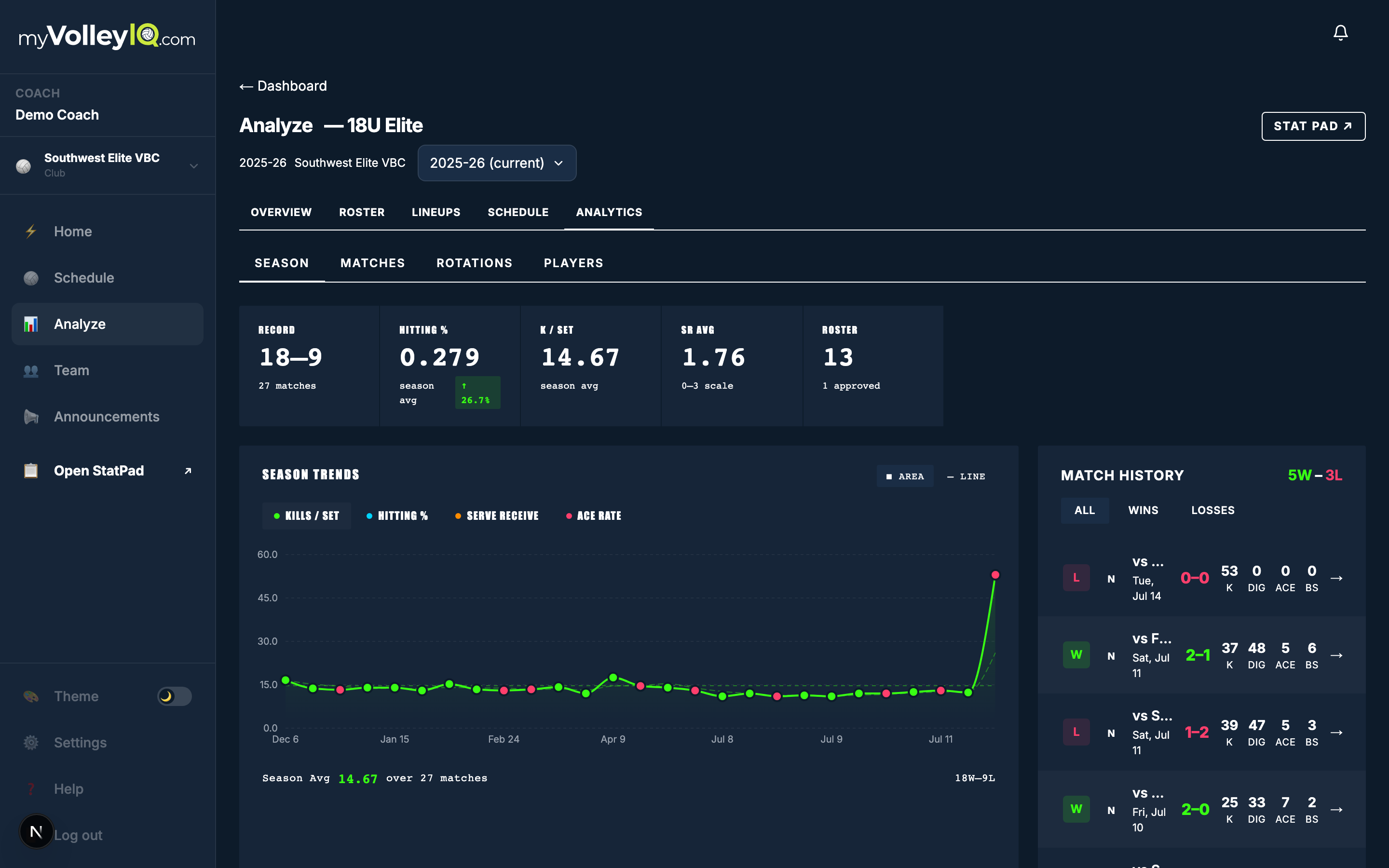
Analyze: leaderboards, trends, and match history from your live taps
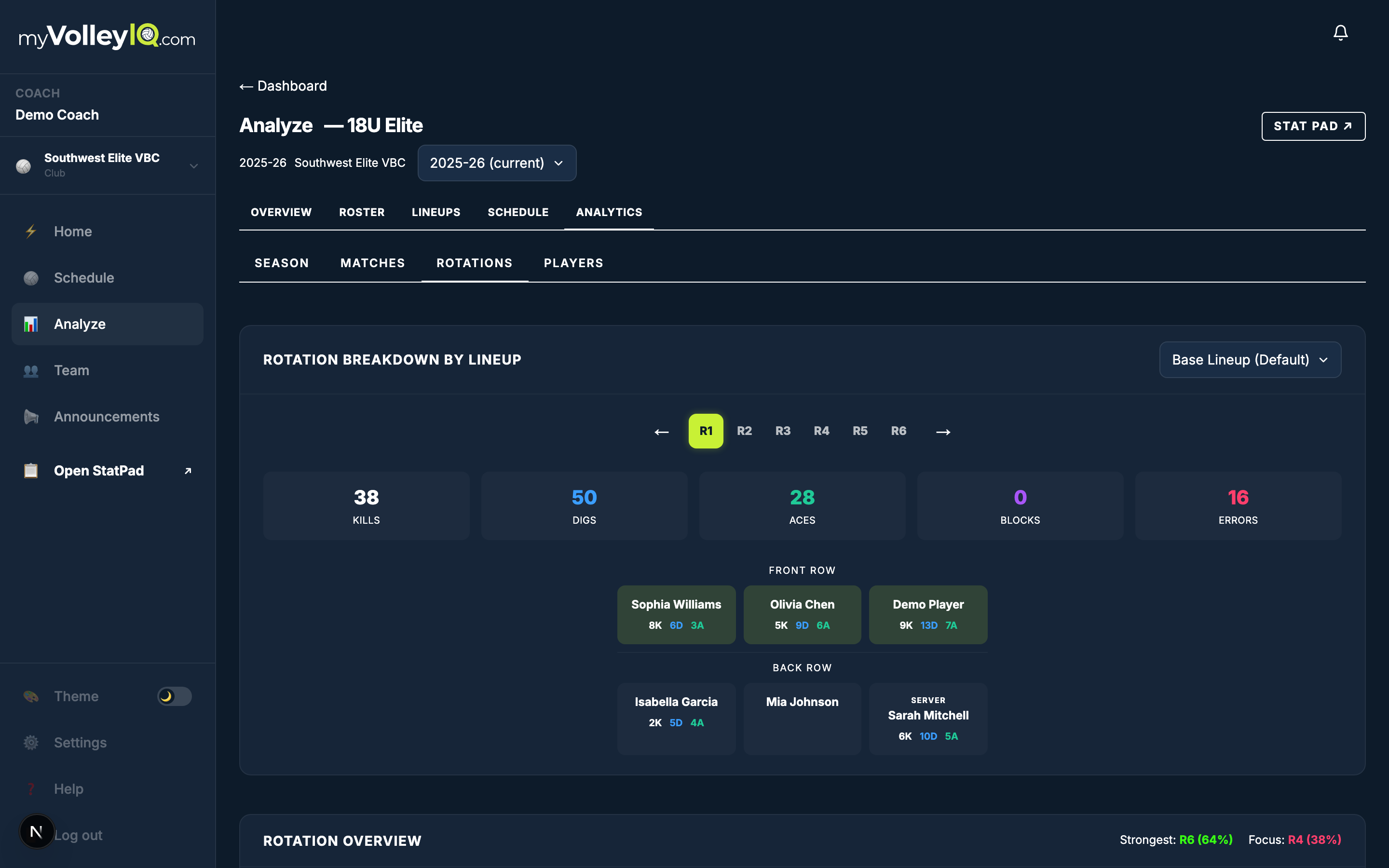
Rotation analytics: spot the leak before your opponent does
04
Rotation and personnel evidence
The question every bench argues about is who should be on the floor. VolleyIQ records the rotation and the actual six players for every rally, so it can answer with numbers instead of memory.
- Side-out rate, break-point rate, and scoring for each of your six rotations
- Per-player stats by court position inside every rotation
- Compare the same rotation with different personnel: before-and-after numbers for any lineup change you tried
- Small samples get flagged, so two rallies never masquerade as a trend
Find the rotation that bleeds points, fix it in practice, and then check whether the fix actually moved the numbers the next weekend.
05
AI coaching that read every rally
After a match, generate an AI overview: a plain-language read of the box score, rotations, and momentum that ends in specific next steps. Tournaments get the bigger version. The AI Event Overview reads the whole weekend and judges whether your changes worked.
- What carried and what to fix, with the evidence behind each claim
- Moved a starter after day two? It checks whether the struggling rotation recovered, with before-and-after numbers
- Opponent-by-opponent notes for the rematch, and practice priorities from recurring patterns
- Lineup experiments worth testing next, with position and libero guardrails
- Honest about small samples: it says so instead of pretending eight rallies prove a trend
Overviews save with the match or event and reopen instantly. You can also hand-pick up to 12 matches (a road trip, one rival all season) and run the same breakdown on that selection.
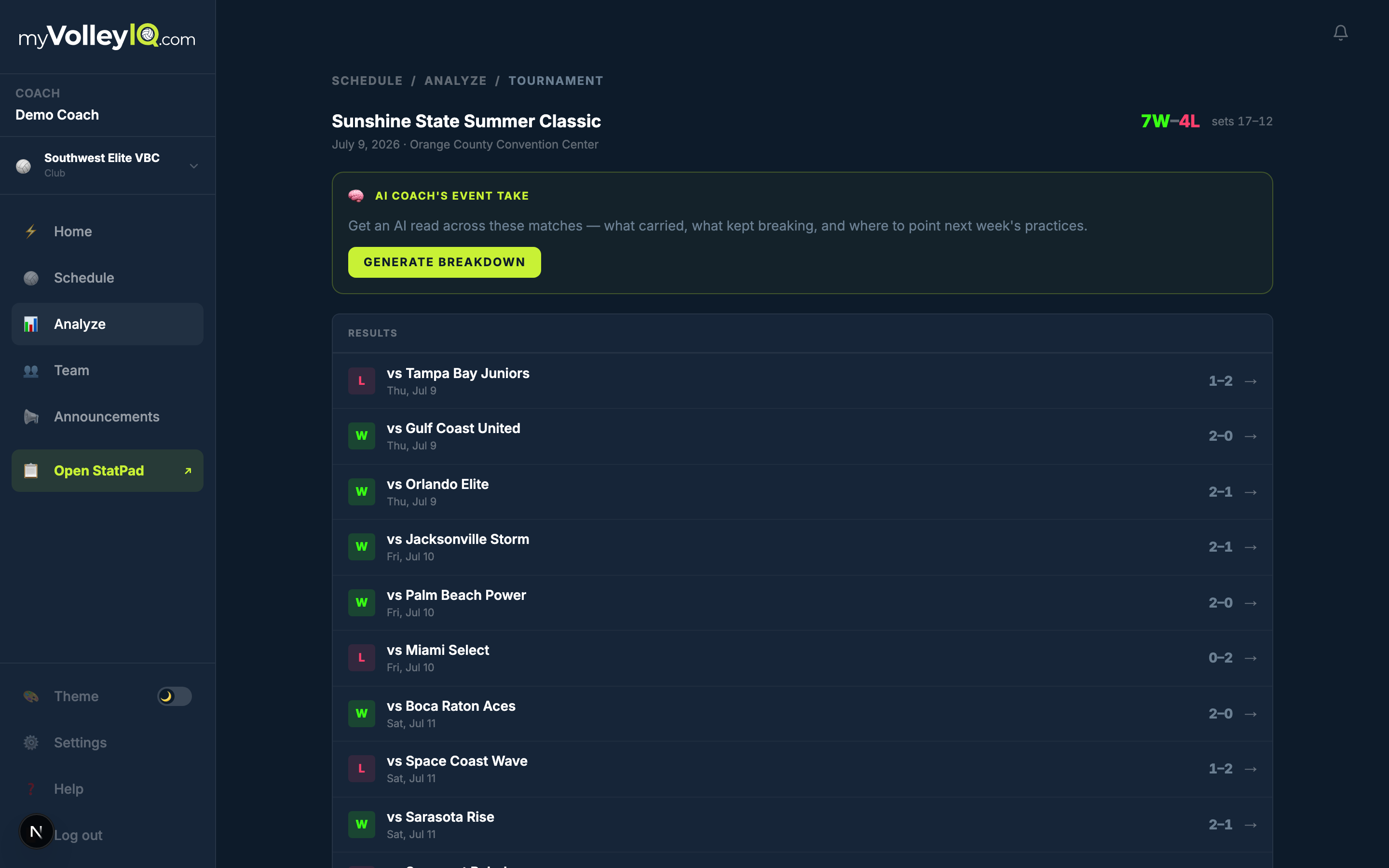
The tournament breakdown: results, cumulative box score, and the AI Event Overview
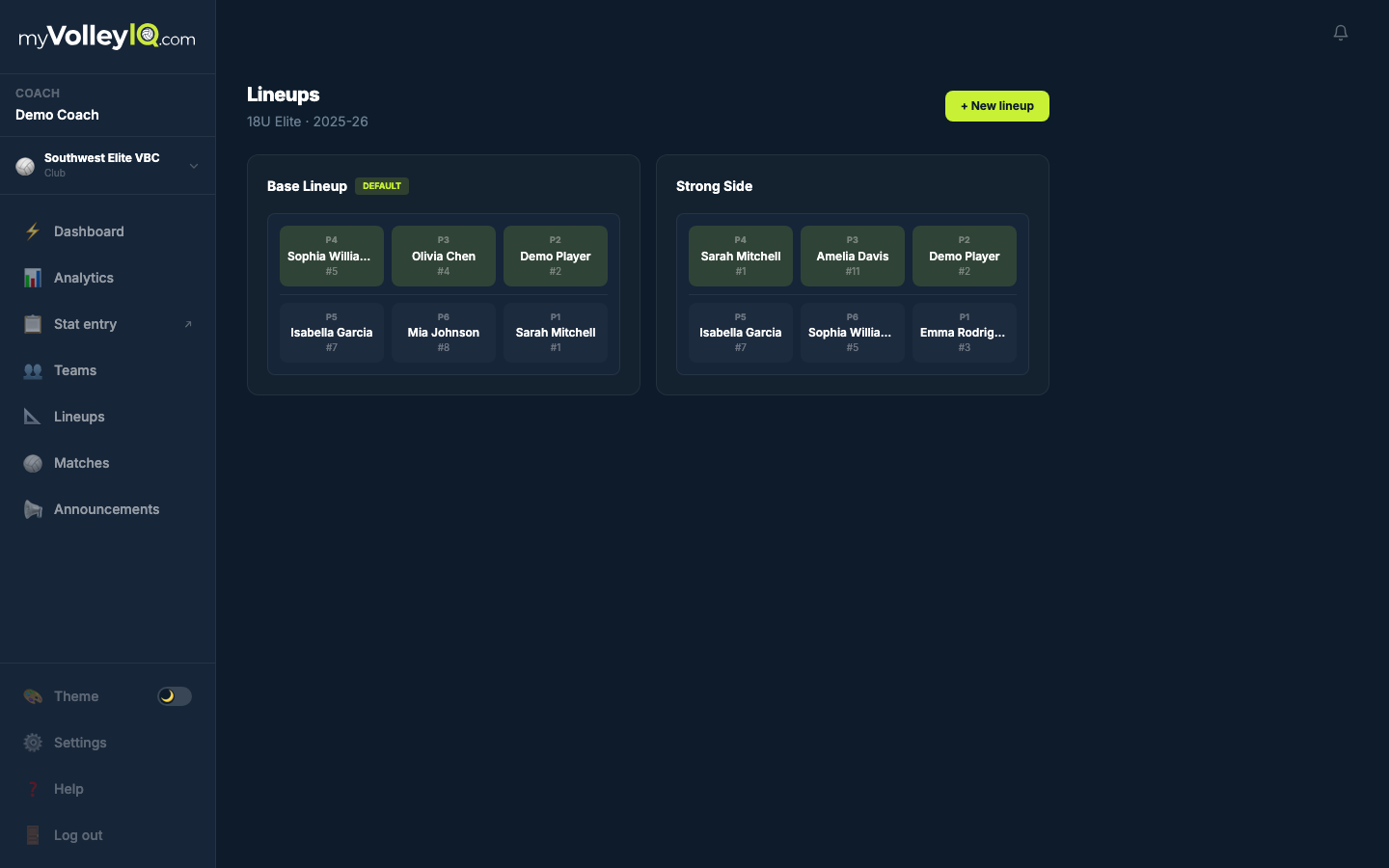
Saved lineups: set them up once, load them all season
06
Lineups with substitution plans
Build your lineups once. StatPad offers them at every set start, and your planned subs pop up at the rotation you chose. No more sticky notes on the clipboard.
- Multiple saved lineups per team with a default that pre-loads in StatPad
- Attach subs to a rotation, including after-serve timing
- Libero placement validated before an illegal lineup ever reaches the court
- Lineups link straight to rotation performance, so every change closes the loop with evidence
07
Your team, one workspace
Every team gets a workspace with Overview, Roster, Lineups, Schedule, and Analytics that never loses context. Rosters handle the messy reality of club volleyball: some kids have accounts, some don't yet.
- Stat players by name before they ever sign up, then link their account later and the history follows
- Roster invites players approve themselves, so nobody’s stats move without consent
- Assistant coaches get their own logins with permissions you control, down to stat entry vs. roster vs. analytics
- Archive a team at season’s end and every stat stays browsable in Past Seasons
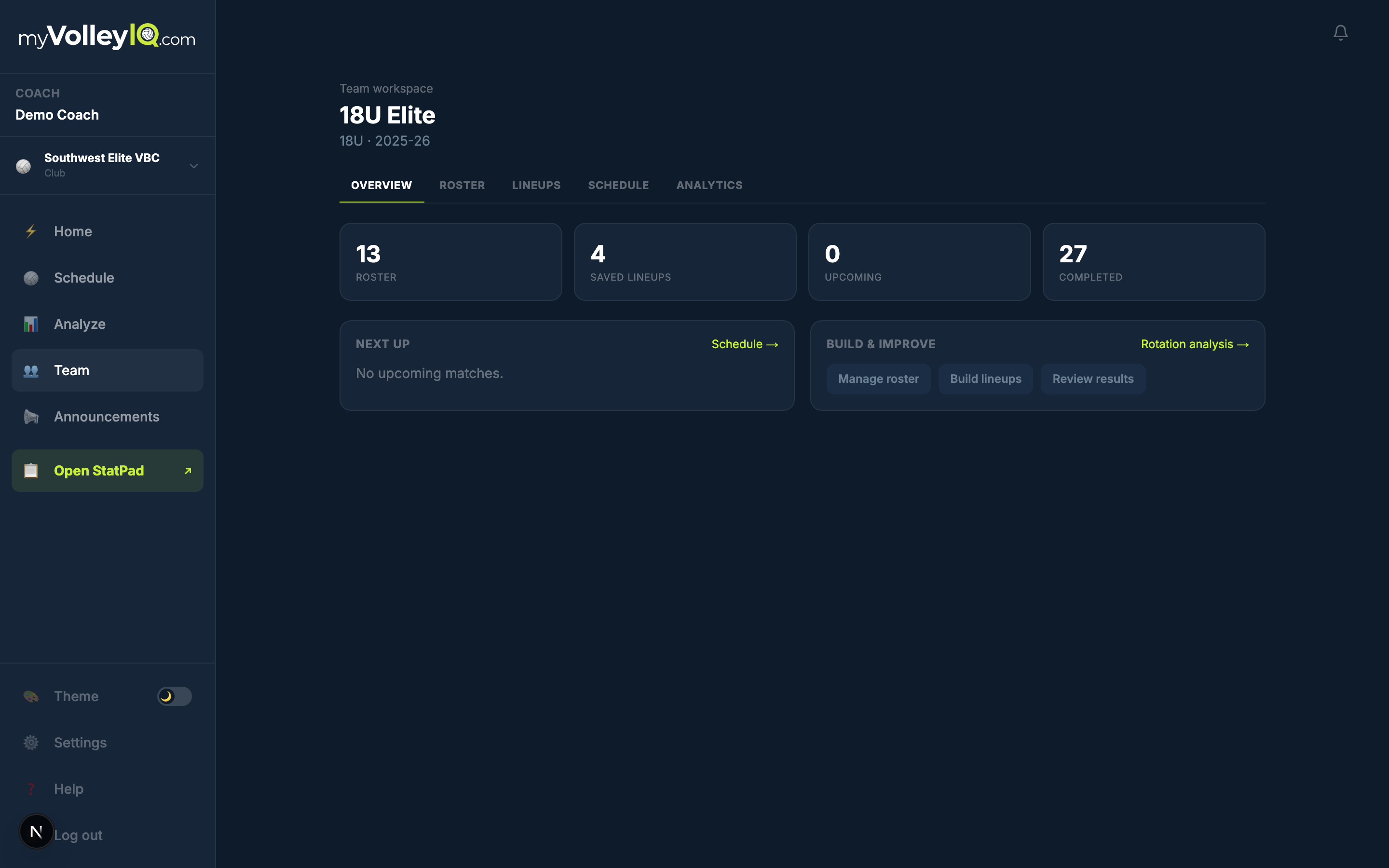
The team workspace: five views, one team, context that never resets
08
A live link for the stands
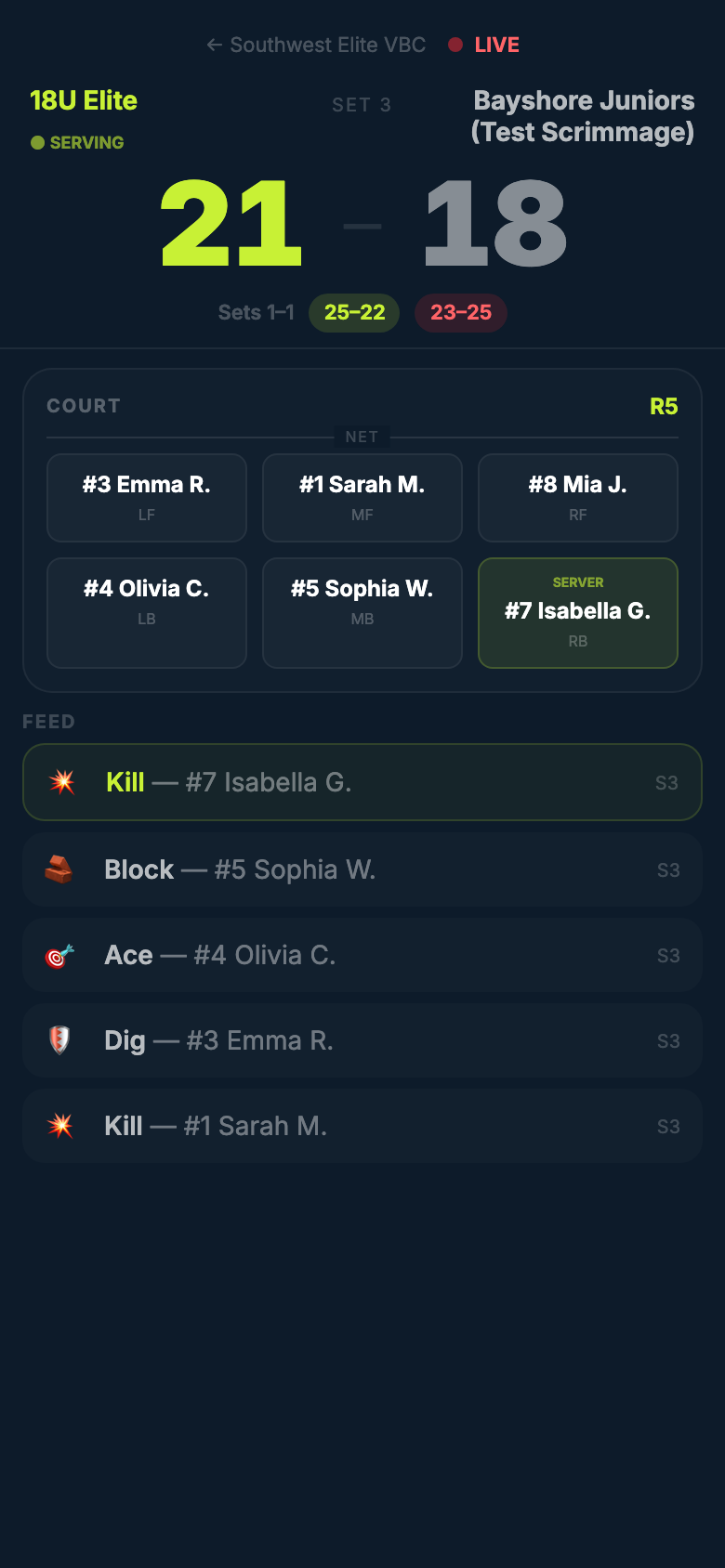
Share one URL with families. While you stat the match, they watch the score move and see who's on the court, with a play-by-play feed underneath. It updates every few seconds.
- Big score, set history, server highlighted on a court diagram
- Kill/ace/dig/block feed with player names
- Between games it shows your upcoming schedule, so the link is worth bookmarking all season
- No accounts needed for viewers, and grandparents three states away get the same seat
09
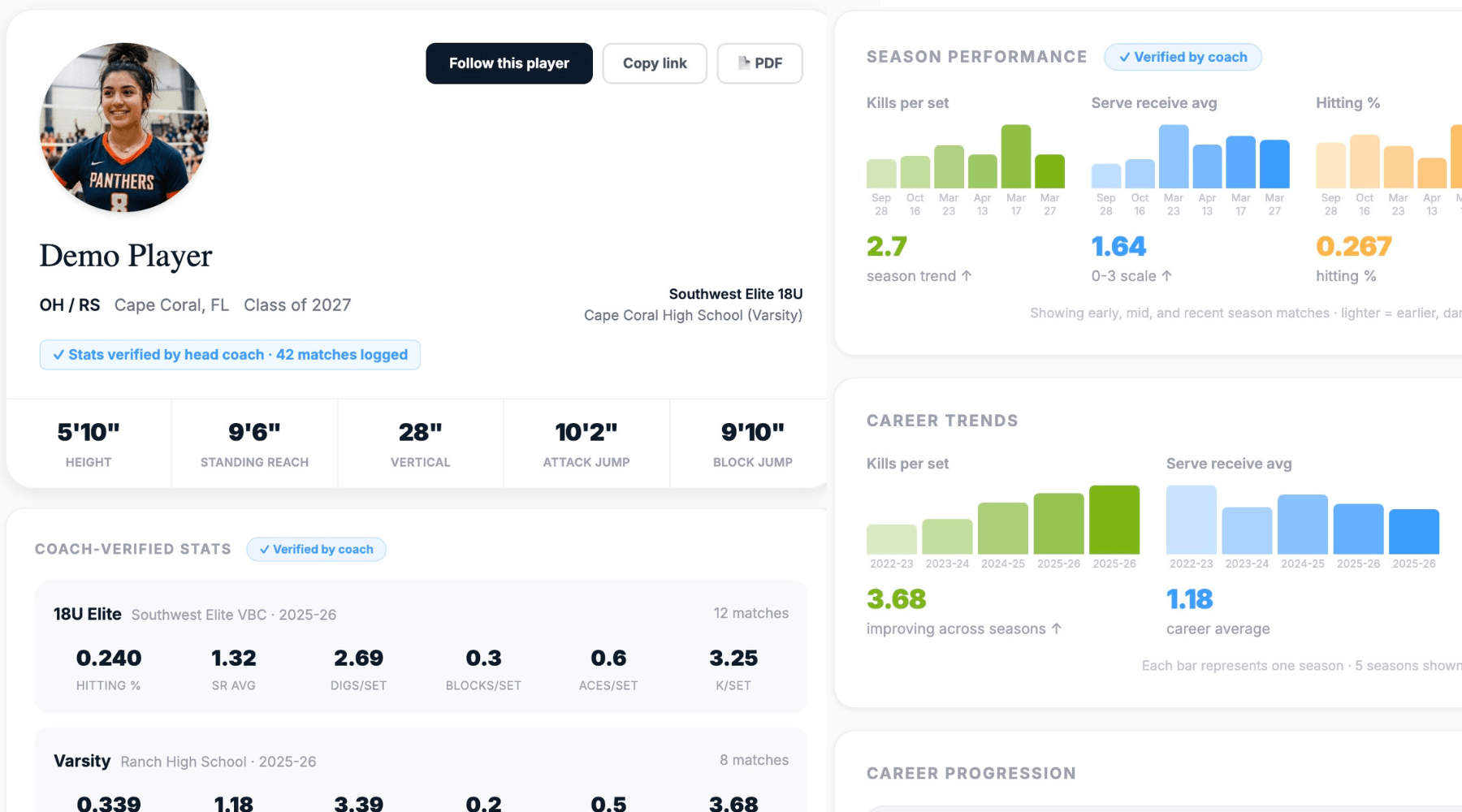
Every stat builds a recruiting profile
This is the part your players' families will care about: each kill you tap flows to a coach-verified public profile that college coaches can actually trust. You do nothing extra.
- Verified badge on stats a coach entered, kept separate from self-reported
- Season-by-season career progression across every team the player has been on
- Players run their own college pipeline: contact logs and next steps, with NCAA deadlines built in
- One-tap intro emails to college coaches, drafted from their real stat line
- Players also get a personal AI development plan with priorities and safe at-home drills, built from the stats you entered
Running a whole program?Directors get every team under one login: org switcher, per-team licenses with consolidated billing, and a club view that puts every team's record and key stats on one line with the full coach view a click away. The demo director account below shows all of it.
There's a parent side too:parents can track their own kid from the stands with a simplified StatPad, even on teams that don't use VolleyIQ. Not the focus for you, but if a team parent asks, it exists.
Take the test drive
Three demo accounts, loaded with a full season of sample data including an 11-match tournament with lineup changes for the AI to chew on. Click around. You can't break anything.
Director
Runs Pacific Coast VBC + Mission Bay High School
demodirector2@myvolleyiq.com
DemoDirector2!
Coach
Coaches PCVC club + Mission Bay HS teams
democoach2@myvolleyiq.com
DemoCoach2!
Player
Plays for both, has a recruiting pipeline
demoplayer2@myvolleyiq.com
DemoPlayer2!
Game day, in five minutes
- As the coach: tap Open StatPad → open the Del Mar Juniors (Test Scrimmage) match, pick a lineup, choose who serves.
- Tap KILL, tap a player on the court, and watch the score move on its own. Notice the confirmation ribbon.
- Open myvolleyiq.com/live/pacific-coast-vbc on your phone while you stat. That's what the stands see.
- Try DBL BLK (tap two players). Sub a bench player in. Then hit Undo and watch it reverse the whole rally, score included.
- Turn on airplane mode and keep tapping. Everything syncs when you reconnect.
After the match, in five more
- Go to Analyze → the summer tournament has 11 completed matches. Open its breakdown from the 🏆 header.
- Read the AI Event Overview. The demo season includes a mid-tournament lineup change, so ask yourself: did the AI catch it?
- Open Rotations and find the weak rotation the AI was talking about.
- As the director: check the Teams hub, licenses, and the org switcher under your name.
- As the player: open myvolleyiq.com/p/ava-rodriguez-27 to see where every coach tap ends up. Then try My Schools → a school → ✉ Intro email.